

View your Accounts on WSB Business Online
More advanced tools to better manage your business
It is a secure, easy-to-use system that includes the following services benefits:
- Responsive design to enhance your mobile, tablet, and desktop experience
- Intuitive navigation
- Enhanced functionality for stop payments
- View transactions and balances in real-time as they are processed
- Enhanced wires and ACH transfers*
- Transfer funds to WSB accounts
- Make loan payments to WSB accounts
- Pay bills online with CheckFree Business Bill Pay*
- New Personal Profile to simplify managing your user information
- Create statements as needed
- Create detailed reports
- eAlerts
- eStatements
Explore what's new
We encourage you to watch the new Business Online video tutorial to fully appreciate the new platform:

FAQs
I only see an available balance on the Homepage, how can I view my account actual balance?
Select “Accounts” from the dark blue banner on top of the page. Your Current Balance and Available Balance for all accounts will display. Click on the Account to see Account History information.
How do I find my eStatements?
Select "Accounts" and click on the account for which you would like to access your eStatements. Select the “Documents” tab to open the eStatement site.
How do I place a Stop Payment?
Select “Checks & Deposits” from the dark blue ribbon on the top of the page.
Will all of my information be available?
Yes. All of your information, reports, templates, and user settings from the previous version of Business Online Banking are automatically installed and ready to use.
Ideal for:
- Any business with a Watertown Savings Bank business account
- Businesses that want to grant full or limited use of Business Online Banking to employees
Get started!
Start your Business Online Banking Application
*Services subject to pre-approval and fees. Reference the Ancillary Fees Schedule for additional information.
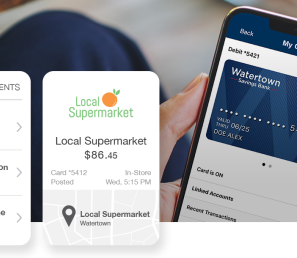
Experience more convenience, enhanced spending insight features, and greater card protection through the new and improved "Manage my Cards" feature on the WSB Mobile Banking app!

Discover the ease and convenience of managing bank accounts, transferring money, and paying bills through WSB Online. We also encourage you to set up alerts to stay up-to-date on account activities you choose notifications for.

Take advantage of exclusive mobile features and access key benefits of WSB Online on the go
